
Outcomes
An outcome is a list of actions that run after the decision. A rule has two lists, On approve and On reject. Each step also has When this step is approved, which runs when that step is approved.
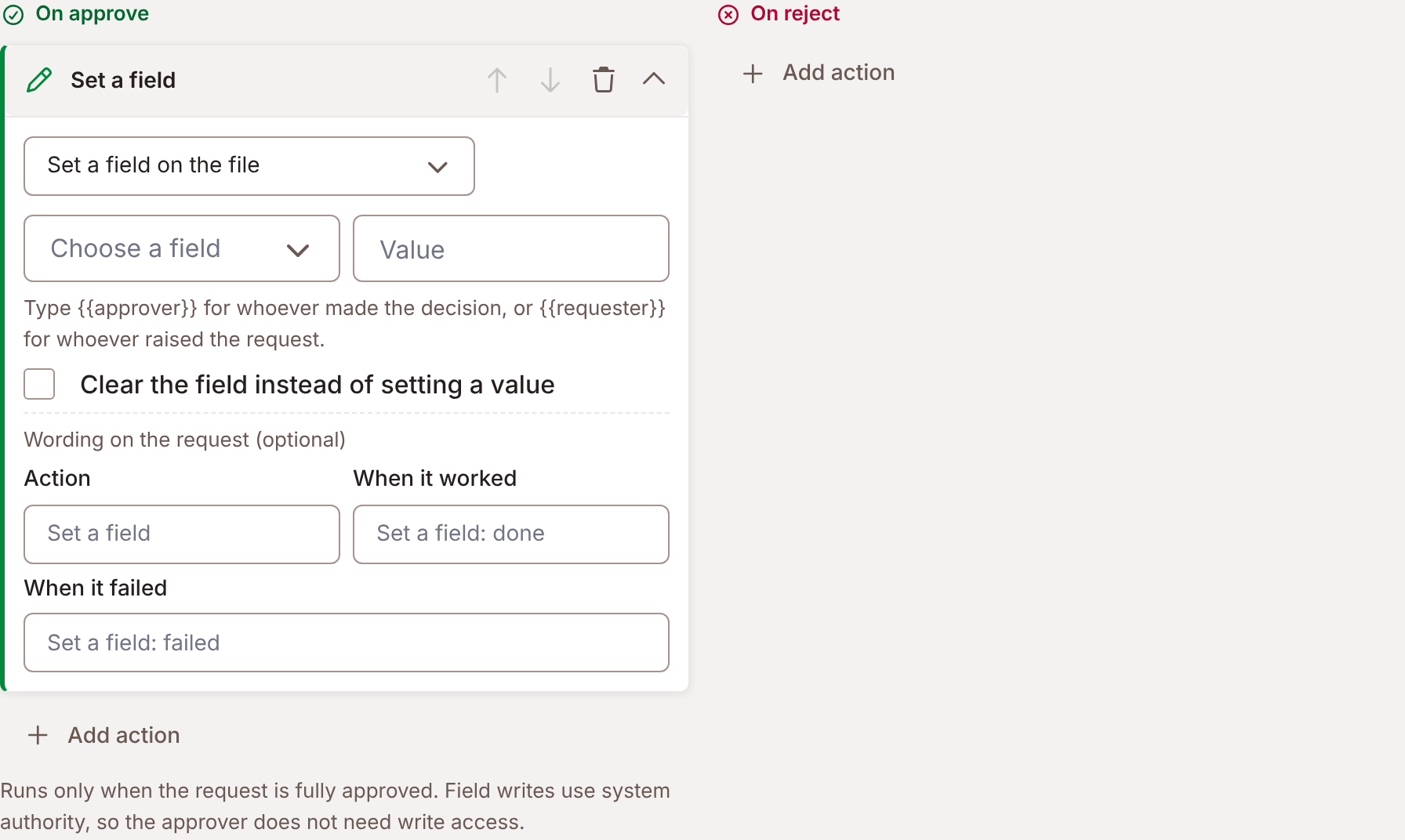
On approve runs only when the request is fully approved. On reject runs only when the request is rejected. A rejection at any step rejects the whole request. Foldr runs the actions after the decision has been recorded, so a failed action never undoes the decision.
Actions
Section titled “Actions”Add action adds a row, which starts as Set a field on the file. Its first drop-down changes the type. There are three.
| Action | Does |
|---|---|
| Set a field on the file | Writes a value to a custom field, or clears it. |
| Send a notification | Mails the requester and others. |
| Run an automation | Runs a MaSH script with the file and the decision details as input. |
Field writes use system authority, so the approver does not need write access.
Set a field on the file
Section titled “Set a field on the file”Choose the field and a Value. A text value can use two tokens: {{approver}} for whoever made the decision and {{requester}} for whoever raised the request. For a people field, choose Whoever approved it (Whoever rejected it on a rejection) or Whoever raised the request. Clear the field instead of setting a value empties it.
Send a notification
Section titled “Send a notification”Notify the user who raised the request sends the requester a receipt. Also notify takes users and groups, and Email addresses, comma separated. Optional note to include adds your words.
Run an automation
Section titled “Run an automation”Choose the automation. It says No automations are available. Create one in MaSH first. when there are none. See Forms, signing and reviews for what the script receives.
A rule that raises a request on a file field also stops reacting to the field its own outcome set. That includes a field an automation sets while the rule’s actions run.
Wording on the request
Section titled “Wording on the request”Each action can carry words the approver and requester read. Open Wording on the request (optional):
| Setting | Default |
|---|---|
| Action | The action’s name, for example Run an automation. |
| When it worked | The action’s name followed by : done. |
| When it failed | The action’s name followed by : failed. |
For example, Place the order, Order placed and Order not placed.
Write the outcome to field writes that wording into a field on the file once the actions have run, and again after a retry. A share that does not carry the field is skipped. One field serves both outcomes. It needs at least one action. The editor says: An outcome field is written after the actions run. Add an action, or clear the outcome field.
Failures and retry
Section titled “Failures and retry”Each action reports done, failed or skipped. A request shows an outcome line:
- Running, then Actions done or the wording you set.
- An action failed, with the reason in the script’s own words.
- Did not finish, when a run stopped part-way and has been silent for 15 minutes.
In the approver’s inbox, Recently decided lists the last 30 days of decisions, failures first, with Decision, Details and Outcome. Retry runs only the actions that failed. An action that worked is never run again, so an order that was placed is not placed twice. The decision is never touched. Retry answers Done or It failed again.
Anyone who could decide the request may retry it, and so may a user who holds Configure Reviews & approvals.
What the requester sees
Section titled “What the requester sees”Foldr tells the requester the outcome by default. Once the decision is recorded and the outcome’s actions have run, the requester gets an email and a notification that the request was approved or rejected. Foldr sends it once. A retry of a failed action does not send it again.
Foldr Cloud now. Appliances from 11.3.
The rule’s Tell the requester the outcome switch turns this off. It sits below On approve and On reject in the rule editor, on by default, and says They get an email and a notification when it is approved or rejected. Rules made before this change are on.

Foldr sends no receipt when:
- the switch is off,
- nobody asked: the request has no requester, or Captur, a script or Governance auto-classification raised it,
- an action of the outcome already tells the requester. That is Send a notification with Notify the user who raised the request and no condition on the action. Foldr does not send a second one.
A Disclose release, a change an API app holds for approval, and link sharing tell their own requester, so they already count as told.
A saved change tells its requester too, whether it is approved or rejected.
A paused request tells the requester by email and in Foldr, with the approver’s reason. A resume tells them in Foldr only. See Approving.
If the rule’s outcome cannot be carried out, the approver sees Approved, but it could not be carried out. The person who asked has been told.
A saved change
Section titled “A saved change”For a share with Changes require approval before publishing, approval publishes the file version. The pending draft stays unpublished for users without write access, and for anyone opening a link, until the approver approves. A rejection leaves the last approved version in place. Foldr does not restore the file.