
Data sources and lookups
A form can use a MaSH script in three ways: to fill the choices of a question, to run when a button is pressed, and to run after a response is saved. An administrator decides which scripts forms may use. This page is about the first two. The third is in Submit actions.
Using scripts needs the MaSH feature.
Approve a script
Section titled “Approve a script”An administrator opens Settings > Scripting > Forms and the Data sources tab. The tab lists the scripts (called automations) with their Owner, Approved for and Label shown to builders. Choose one to open its panel.
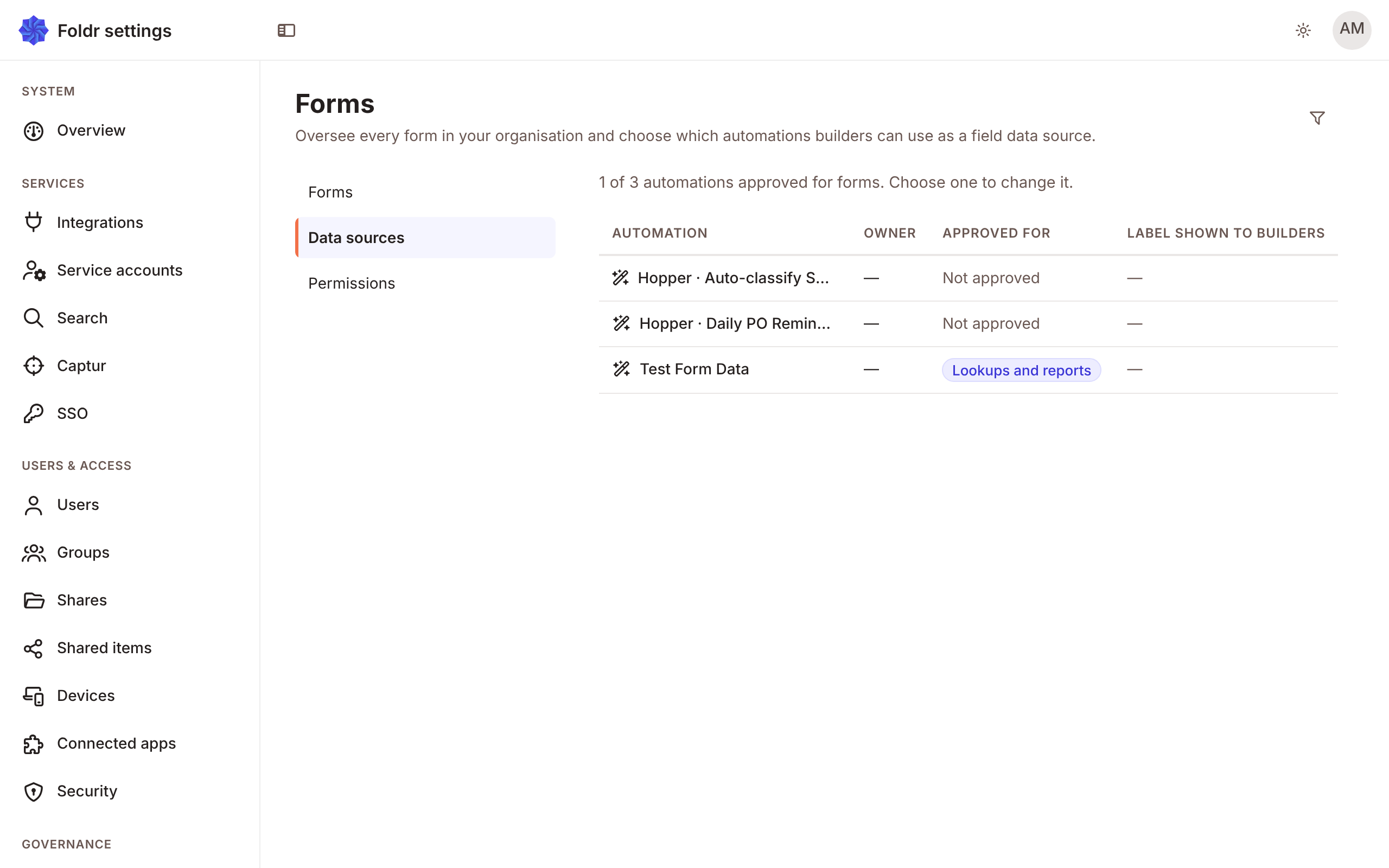
- Switch on Usable in forms. Builders can then choose it. It runs as its owner, whoever fills in the form.
- Set Approved for:
| Choice | Means |
|---|---|
| Lookups and reports | It fills in a field’s choices, runs when a form opens or on a button, or feeds a Foldr Bureau Insights report. It returns data. |
| Run on submit | It runs after each response is saved, with what was submitted. Nothing comes back, so it can act on every submission. |
| Both | Either. |
A script newly approved is for Lookups and reports only.
- Give it a Label shown to builders, or leave it blank to show the script’s name.
A script that is no longer approved is not offered, and a form that still names it skips it.
Lookup questions
Section titled “Lookup questions”A Lookup question gets its options from an approved script. Set:
| Setting | Does |
|---|---|
| Data source (automation) | The script. |
| Display as | Type-ahead search, where the script receives the typed text and filters, or Dropdown. Use type-ahead for long lists. |
| What to capture | The whole selected object, or The selected value. |
| Detect fields | Reads the properties the script returns, so you can pick them below. |
| Display property | Which property shows in the list. Blank if the rows already use label and value. |
| Key property | Which property identifies a row. |
The script runs when someone fills in the form and receives the current answers, so a lookup can depend on another answer.
When you capture the whole object, read its properties in expressions, for example answers.customer.email.
answers.customer.tier == "gold" ? "Priority" : "Standard""Priority"Autofill from a lookup
Section titled “Autofill from a lookup”Autofill from a lookup on another question fills it from a property of a lookup’s chosen object. Pick the lookup and the Property. A source that returns plain values has no properties.
Lookups in a table
Section titled “Lookups in a table”A table column of type lookup looks up per row. Capture the whole object so a computed column can use its properties, for example row.item.price * row.qty.
Run on a button
Section titled “Run on a button”A button, a change of an answer, or the opening of the form can Run automation. The script gets the current answers as mash.event.answers and the variables as mash.event.vars. What it returns goes into fields, into variables or both. Give a key when the result is a single value.
On a form anyone can open, the script runs as the form owner. On a form for named people, it runs as the person filling in the form.
What the script receives
Section titled “What the script receives”See Forms, signing and reviews for mash.event.answers, mash.event.vars and the Form Completed event.