
Question types
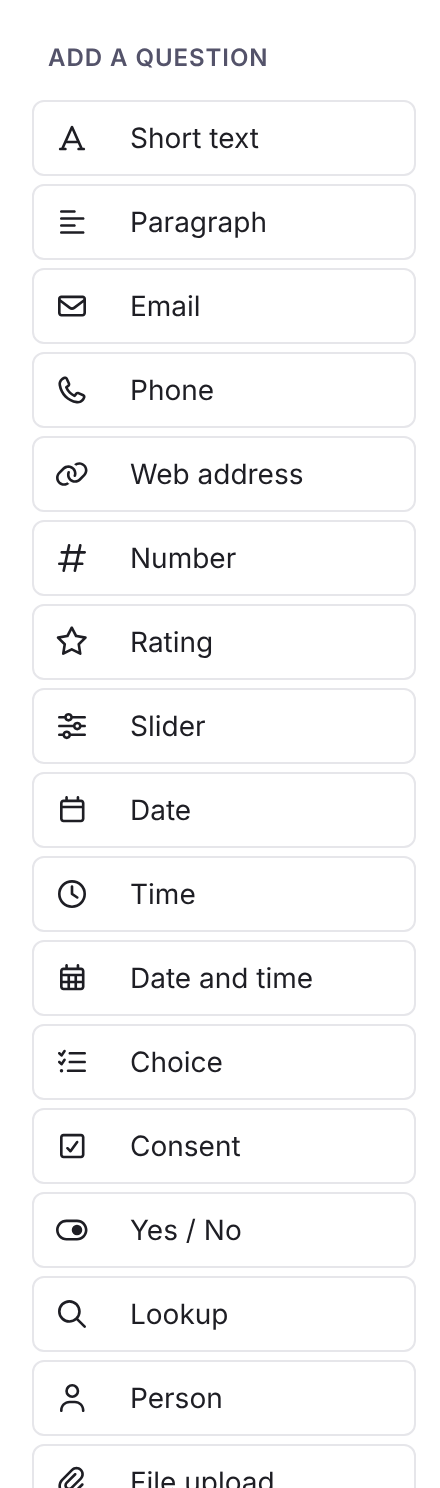
This page is the index of the question types, written by hand. A per-type reference, generated from the builder’s own list of types and options, will sit beside it. Until then the options below are the labels in the builder.
Answers
Section titled “Answers”| Type | Stores | Options |
|---|---|---|
| Short text | Text | The question settings. |
| Paragraph | Text | As Short text. |
| Text, checked as an address | As Short text. | |
| Phone | Text, with a country picker | As Short text. |
| Web address | Text, checked as an address | As Short text. |
| Number | A number, decimals allowed | As Short text. |
| Rating | A whole number | Number of stars. |
| Slider | A number | Minimum, Maximum, Step. |
| Date | A date | Precision: Day, Month or Year. Month and Year save the first day. |
| Time | A time | Precision: Minute or Hour. |
| Date and time | A date and time | Precision: Minute or Hour. |
| Choice | One option, or several | Choice style: Dropdown (one), Radio buttons (one), Checkboxes (many). Each option has a Label and a Value. See below for Use the field’s allowed values. |
| Consent | Yes or no | Consent statement, Emphasis: Neutral, Highlight, Caution, Important. |
| Yes / No | True or false | Style: checkbox or switch. Never required: unticked is No. |
| Lookup | A value, or a whole record | See Data sources and lookups. |
| Person | A person or group | What can be picked: People, Groups or People and groups. Allow more than one, Most that can be picked, Limit the choices to these groups. |
| File upload | One or more files | Files accepted: Documents and images, Documents only, Images only, Any file. |
| Choose a file in Foldr | A reference to a file in Foldr | Choose from: One share or Limit to a share or folder. Only signed-in people can answer. |
| Signature | A drawn or typed signature | The question settings. |
| Hidden value | A value worked out on the server, never asked | Value (an expression), or a preset: Submitter email, Submitter name, Username. It can be saved to a field. |
| Table | A list of rows | See below. |
A Person question on a form anyone can open must have at least one group in Limit the choices to these groups, or the respondent could search everyone in your Foldr. On a form filled in stages, this applies only to questions filled at the first stage. A Person question filled at a later stage is answered by a signed-in user the form was passed to, so it needs no group limit. A Choose a file in Foldr respondent can only pick files they are allowed to open. Programs, scripts and web pages are never accepted as uploads.
Choice options from a field
Section titled “Choice options from a field”A Choice question that has Save answer to field set to a field with allowed values shows Use the field’s allowed values. Switch it on and the options are that field’s current allowed values on the form’s destination share. Foldr reads them each time the form opens, so a change to the field’s list reaches the form without publishing again.
The builder shows the list read-only, labelled From and the field’s name, in the question’s settings, on its card in the canvas and in Preview. Edit the list on the share, not in the form.
If the field loses its list, or the question stops saving to that field, the question’s own options apply, and the builder says so.
Every Choice answer must be one of the question’s option values, whether the options are its own or the field’s. Anything else is refused with Choose from the list. With several answers allowed, each one is checked.
Hidden value
Section titled “Hidden value”Never put a credential in a hidden value. The expression and the field it fills can be seen in the page’s data. Its value is worked out again on the server when the response is saved.
A Table question collects repeating rows. Each column has a Label, Type, Key and the options for that type. The column types include text, number, choice, yes/no and lookup. A lookup column looks up per row as the person types.
- Show total on a number column totals it under the table.
- Computed value (optional) makes a read-only column worked out per row from other columns by key:
row.miles * row.rate. - Save to (multi-value field) writes the column to a custom field that holds several values.
- Minimum rows, Maximum rows and Add-row button label set the limits and the button.
{"answers": {"items": [{"qty": 2, "price": 4.5}, {"qty": 1, "price": 10}]}}mash.collect(answers.items).sum('qty')3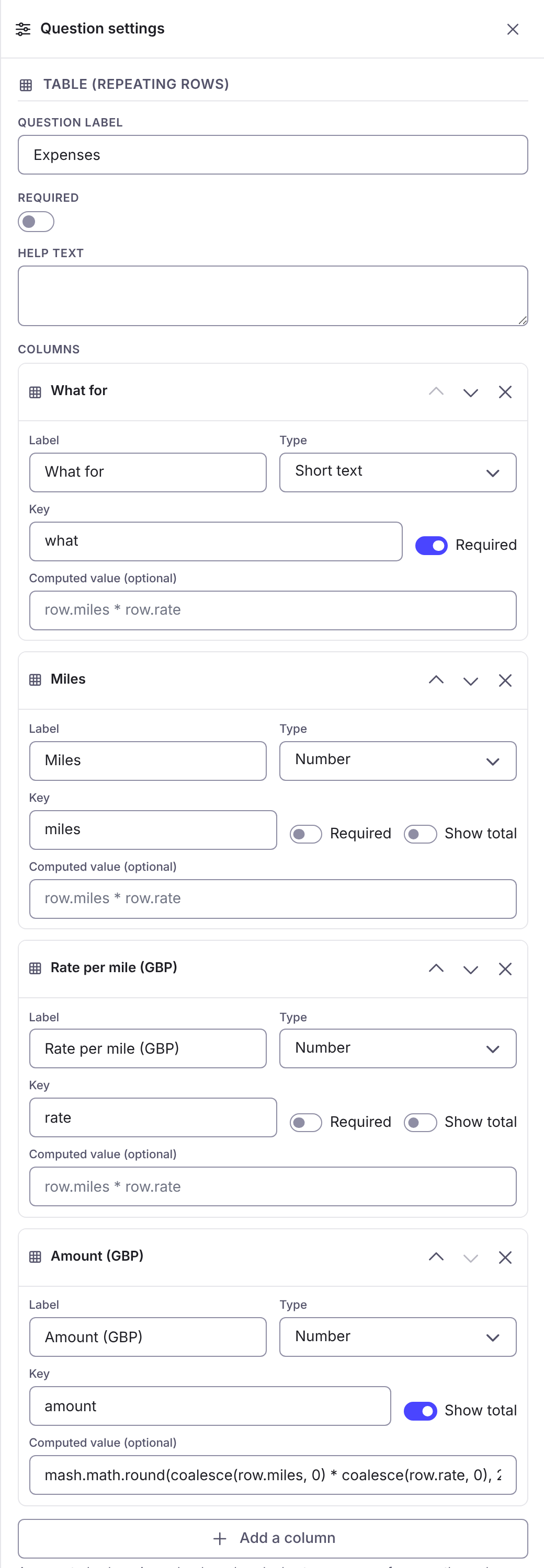
Display only
Section titled “Display only”These show something and store nothing.
| Type | Options |
|---|---|
| Document | Linked file (a shared file), Allow download, Require opening before submit. A public form can only show a file shared with a Public link. |
| Image | Picture: Upload a picture, A file you have shared, A web address or Your logo. Description, Caption, Maximum width, Position. |
| Video | A video you have shared or A video on another website. Show playback controls, Play automatically, Start with the sound off, Repeat when it ends. |
| Text / HTML | Content, with basic formatting only. Live answers can be put in with {{ answers.key }}. |
| Button | Button text, Button style (Primary, Neutral, Success, Danger), Button width, On click actions. See Logic. |
An image is stored with the form, at most 8 MiB and about 25 megapixels. Larger pictures are resized. Link a shared file for anything big.
Layout
Section titled “Layout”| Type | What it does |
|---|---|
| Section | A heading with a Section title. |
| Page break | Starts a new page, with Page title, Page description and Skip logic. |
| Panel | Groups questions. Style: Card (boxed) or Fieldset (legend + rule). Show this panel when hides everything inside. |
| Columns | Puts questions side by side in 2 columns or 3 columns, stacking on a small screen. Show these columns when. |
Panels and columns can hold questions, but not every type can go inside every other. The palette shows Can’t go in this slot for a type that cannot.
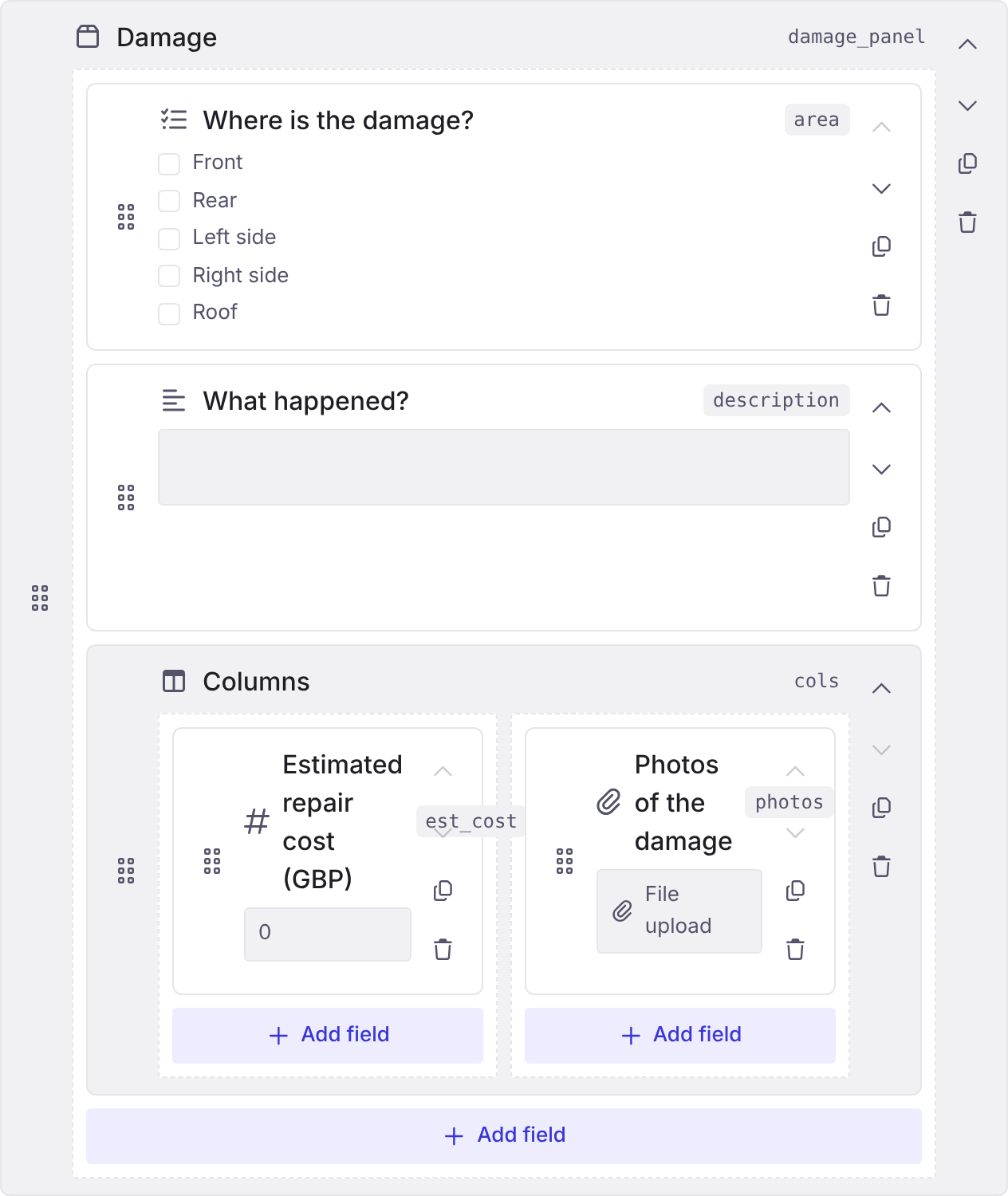
Form width is in Settings > Look & options: Standard, Wide or Full. Use Wide or Full with columns.
Per-type reference
Section titled “Per-type reference”Generated pages for each type will list here when the question-type registry is published.