
Decision fields
A step can ask the approver to fill in fields as part of the decision. The values are written to the file. A manager approving a purchase can record a budget code. A reviewer rejecting a claim can record the reason.
Foldr Cloud now. Appliances from 11.3.
Decision fields work on rules that approve files. A sharing rule does not offer them.
Adding one
Section titled “Adding one”On a step, under Fields the approver fills in, choose Add a field. The list holds the custom fields an approver may set. It says No custom fields are available for an approver to set. when there are none.
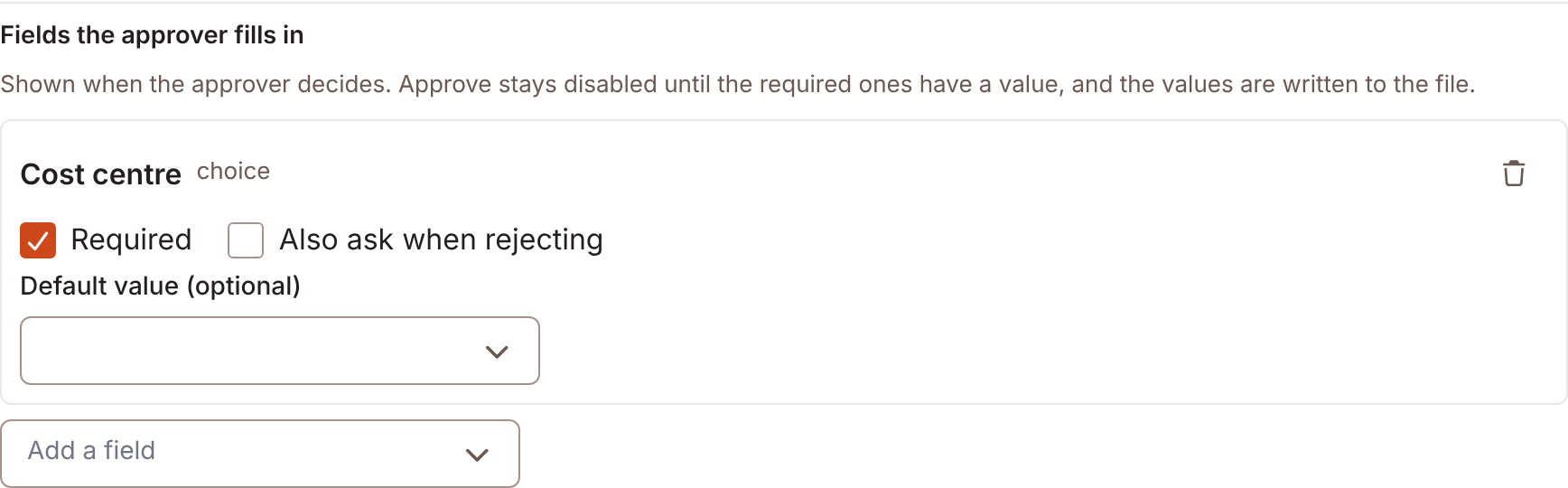
Each field has:
| Setting | Does |
|---|---|
| Required | Approve stays disabled until the field has a value. |
| Also ask when rejecting | Asks on a rejection too. Without it, the field is asked only when approving. |
| Default value (optional) | The starting value. |
Choose Remove field to take one away. A field that was deleted shows A field that no longer exists. Remove it from the step.
Required covers every decision the field is asked on. With Also ask when rejecting on, the field is required on a rejection too.
Field types
Section titled “Field types”An approver can set select, text, number, date, yes/no and people fields. A people field takes one user. There is no default.
Foldr refuses location and signature fields, and fields that hold several values.
What the approver sees
Section titled “What the approver sees”The fields appear in the decision. A field asked only when rejecting says Asked only when rejecting. The inbox row shows Needs and the field names until the required ones have a value.
A hidden field is set, but the approver cannot see it on the file afterwards. The editor says: This field is hidden: approvers choose a value but can’t see it on the file afterwards. An approver who cannot read a field sees A value may already be set. You cannot see it.
Where the values go
Section titled “Where the values go”Foldr checks the values before it records the decision. A refused value keeps everything typed, names the field, and records nothing. A good value is written to the file with the system’s authority, so the approver does not need write access to the field. The step’s list is the only thing that bounds the write: Foldr refuses a field the step did not ask for.
An automation on the outcome receives the choice as decision. See Forms, signing and reviews.